











New Import your docket in any format

Court hearings in Zoom, organized before anyone joins.

Drop in today's docket. Participants register with just their name and arrive in Zoom labeled with their name and role. Your staff runs the whole day from one live view.

  • Uses your court's Zoom account
  • English and Spanish
  • Nothing to connect to your case system

Trusted by courts across Texas and Kansas

  • Texas Judicial BranchTexas Judicial Branch
  • Webb County Court at Law IIWebb County Court at Law II
  • Harris CountyHarris County
  • Kansas District CourtsKansas District Courts
  • El Paso CountyEl Paso County
  • 293rd District Court293rd District Court
  • Child Protection Court, Rio Grande Valley WestChild Protection Court, Rio Grande Valley West
  • Orange County JP, Precinct 1Orange County JP, Precinct 1
  • Hardin CountyHardin County
  • Loving County JPLoving County JP
  • Freestone CountyFreestone County
  • Municipal Court of FreerMunicipal Court of Freer
1Docket import

Upload the docket you already have.

PDF, Excel, Word, CSV or plain text, in whatever layout your court already uses. zconnect reads every case and every person expected on it, along with their role. Your staff reviews anything flagged and approves. That's the setup for the day.

Watch a docket import 2 min
Import docket Tuesday, October 20
PDFExcelWordCSVText
Reading every case and party…10 cases · 29 parties found
2026-CCL2-01187 · 9:00 AMIn re: Protective Order · Ramos
Angela Ramos · RespondentHigh
Marcus Webb · PetitionerHigh
Miguel R0driguez · WitnessReview
Rosa Delgado · InterpreterCheck
Any format, any layout

You stay in control

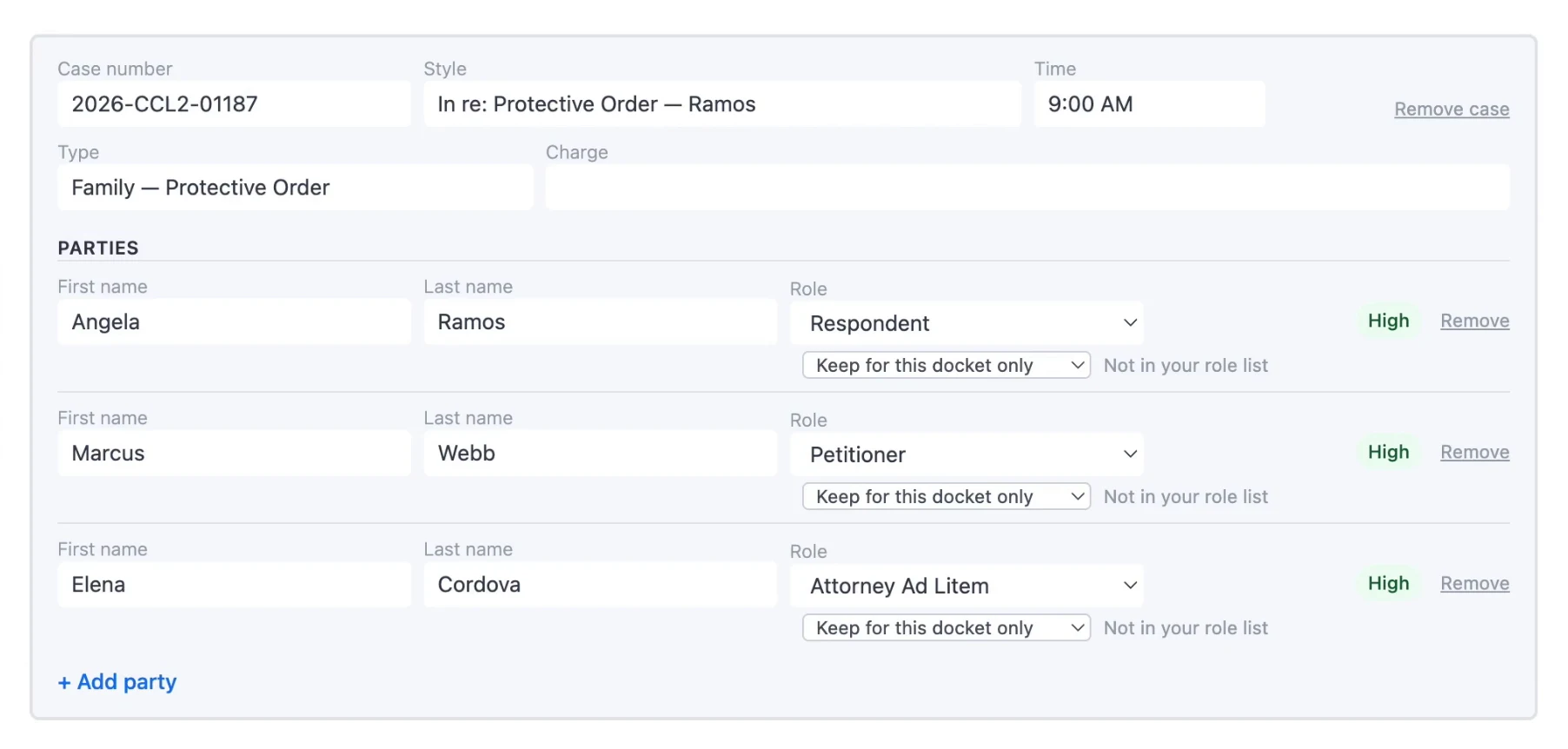
Green means zconnect was confident. Yellow means take a look. Red needs your review. Nothing is saved until you approve.

The docket review screen with case details, parties, roles and confidence labels

Your role names, kept

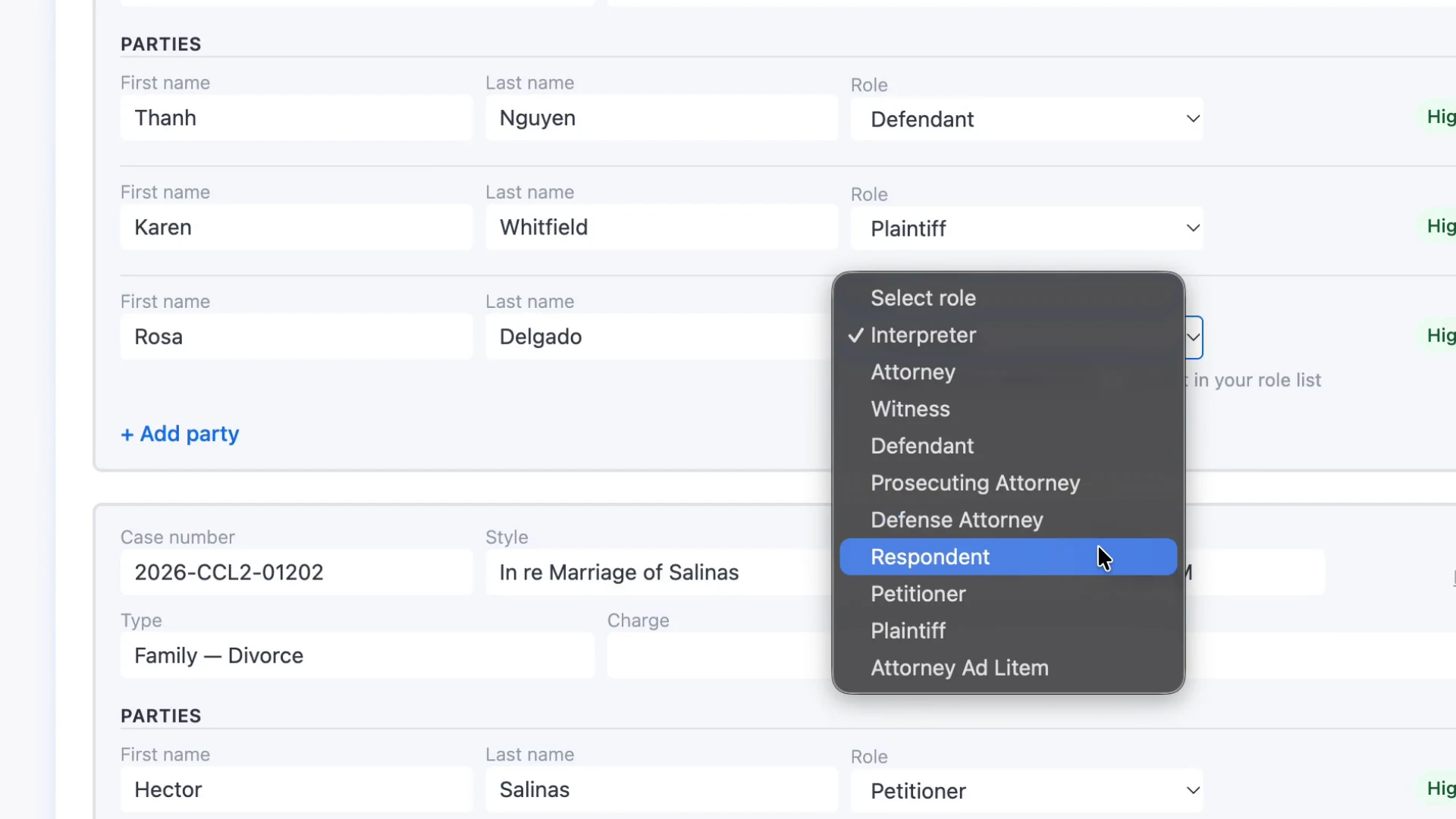
Each person's role is matched to your court's list. A role you don't use yet? Keep it for this docket or add it to your roles.

The role picker on the docket review screen, listing the court's role names
2Smarter registration

They type their name. zconnect finds their case.

One permanent registration link for your court, with your logo and your role names, in English or Spanish. Participants on the docket confirm with one tap, typos and all, and head to your Zoom waiting room.

Watch a participant register 1½ min
County Court at Law No. 2Español
Type your name the way it appears on the court's hearing list.
Find my case
We found you on today's hearing list Are you Angela Ramos, Respondent? Case 2026-CCL2-01187 · 9:00 AM
Yes, that's me
Typos welcome

Your page, your court

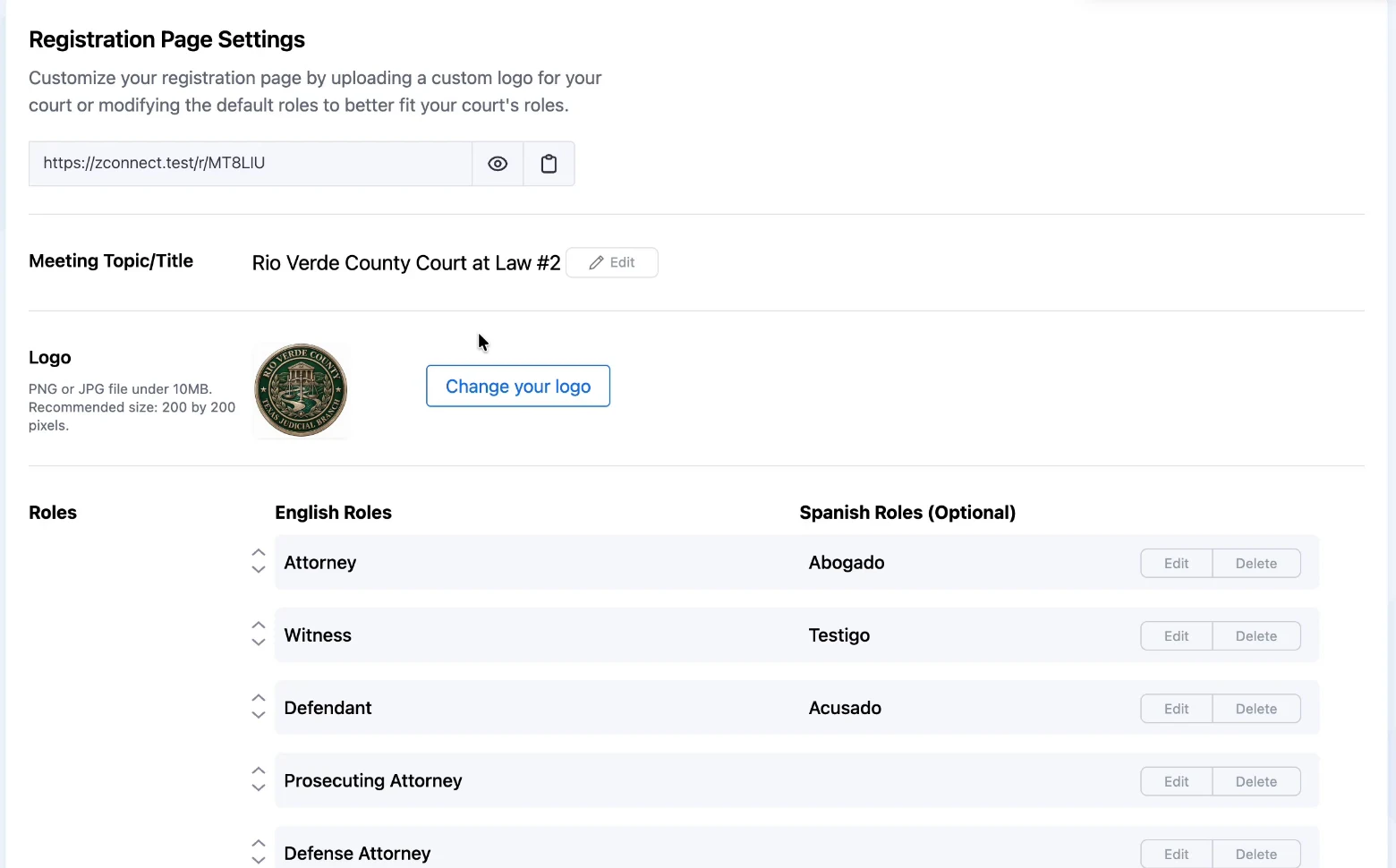
Set your meeting title and logo, and use the role names your court actually uses, with Spanish translations.

Registration page settings with a court seal and English and Spanish role names

Nobody gets stuck

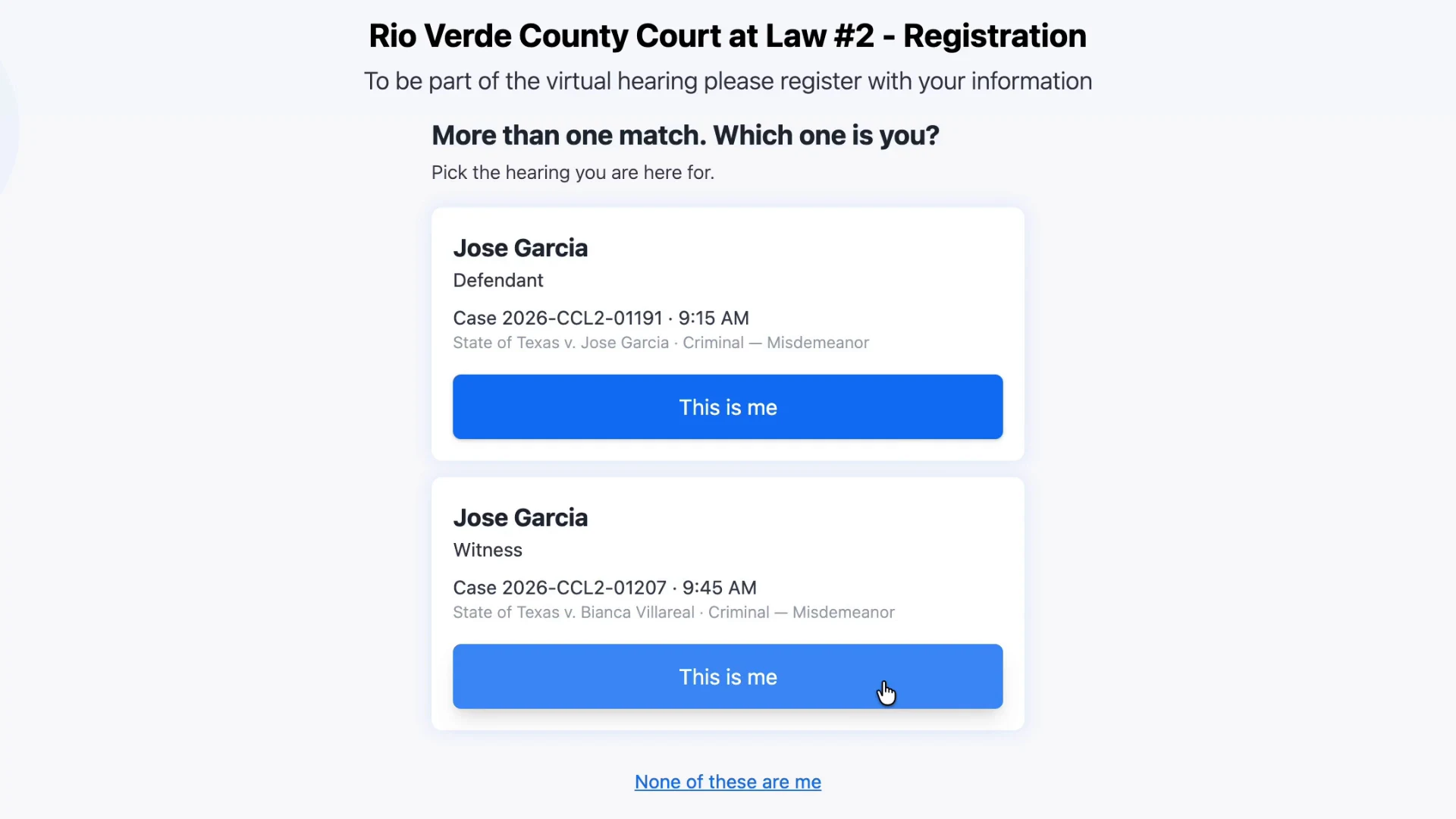
Two people with the same name pick their case. Advocates and visitors check one box and say who they're here for.

Two matches with the same name, each showing a case number and time
3In Zoom, in real time

Everyone arrives labeled with their name and role.

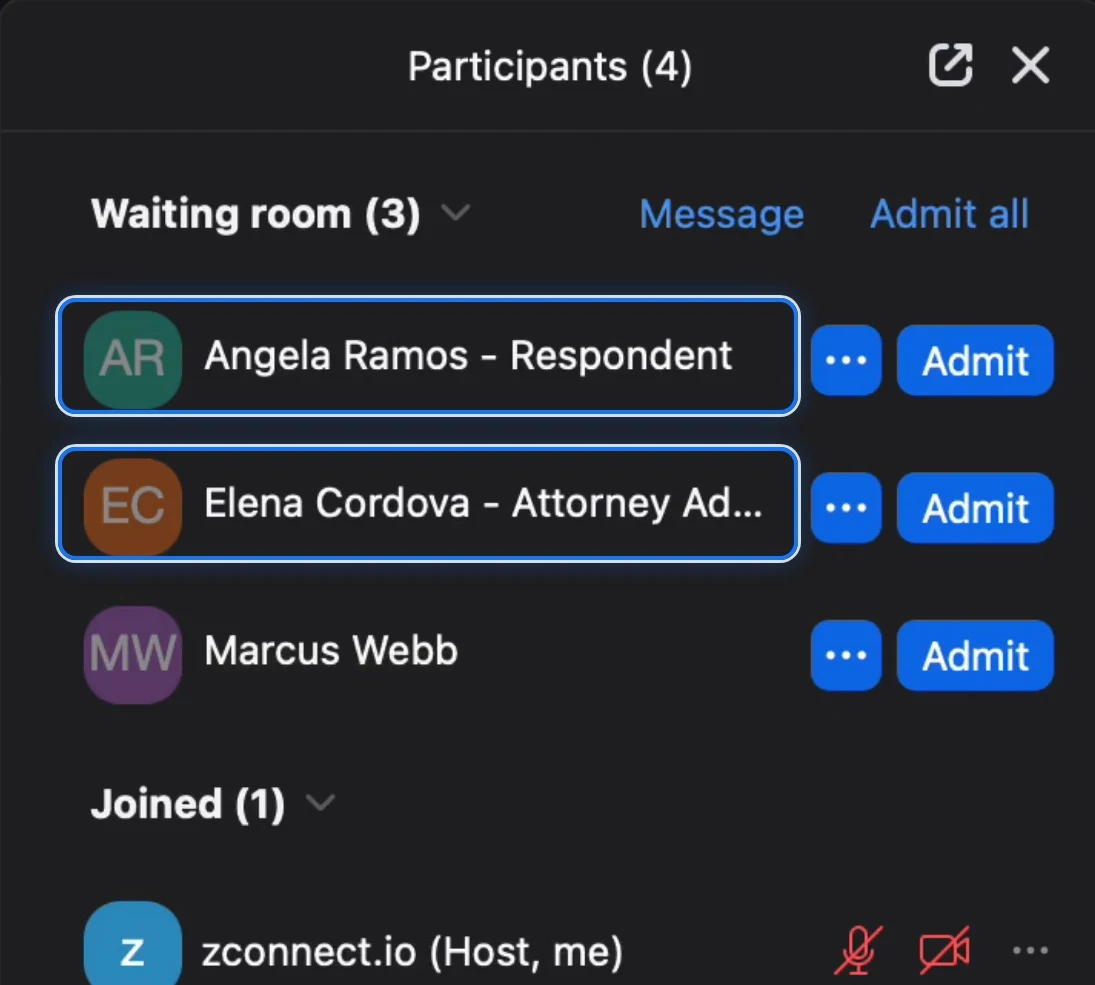
No more guessing who "iPhone 12" is. Participants show up in your waiting room as Angela Ramos - Respondent, whatever device they joined from. You admit people in Zoom the same way you do today.

Participants
Labels show up as people join

The real Zoom participant list

Names and roles come straight from your docket, so nobody has to rename themselves.

Zoom's participant list showing people labeled with their name and role

Think of it as the registration table

Attendees pick up their name badge on the way in, and the hearing runs the way it always has. Nothing to install, and nothing changes about how you run Zoom.

4Live Docket Dashboard

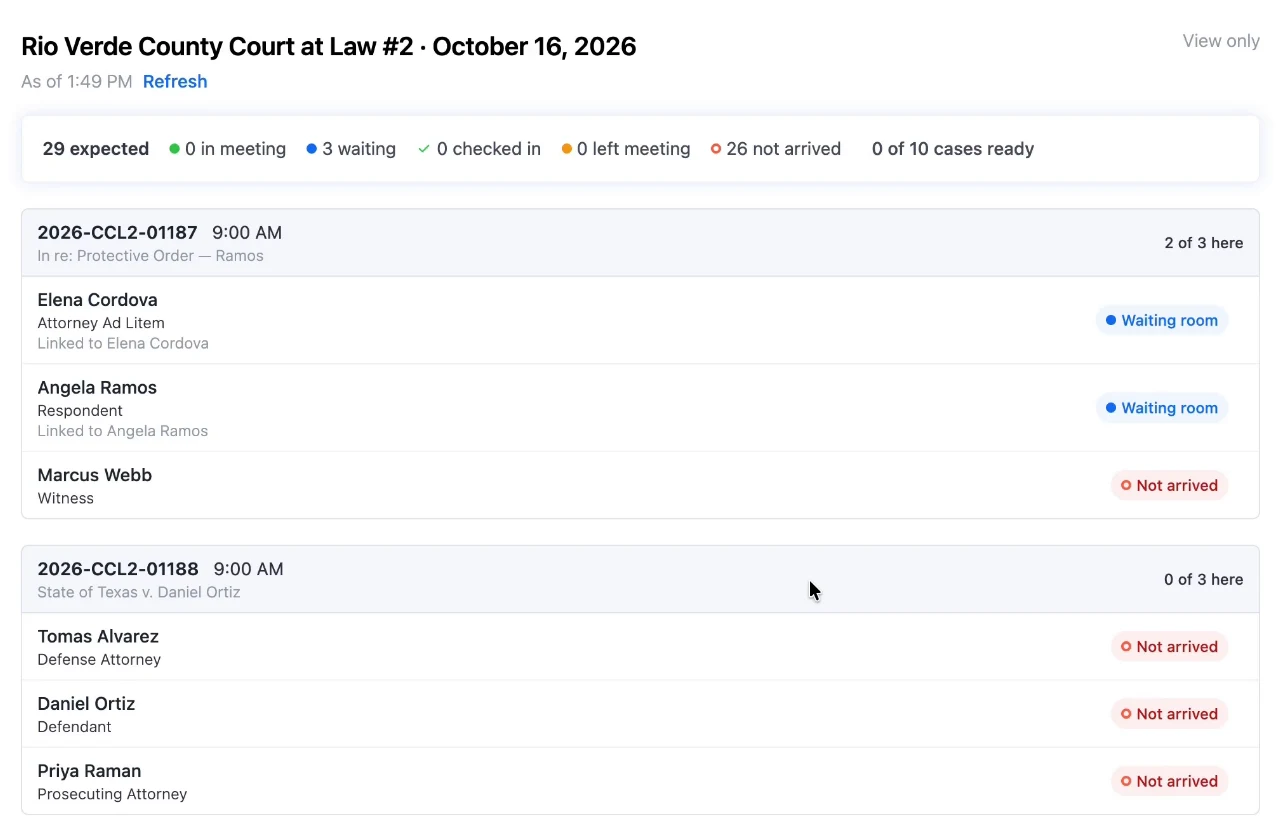
Your docket and Zoom, on one screen.

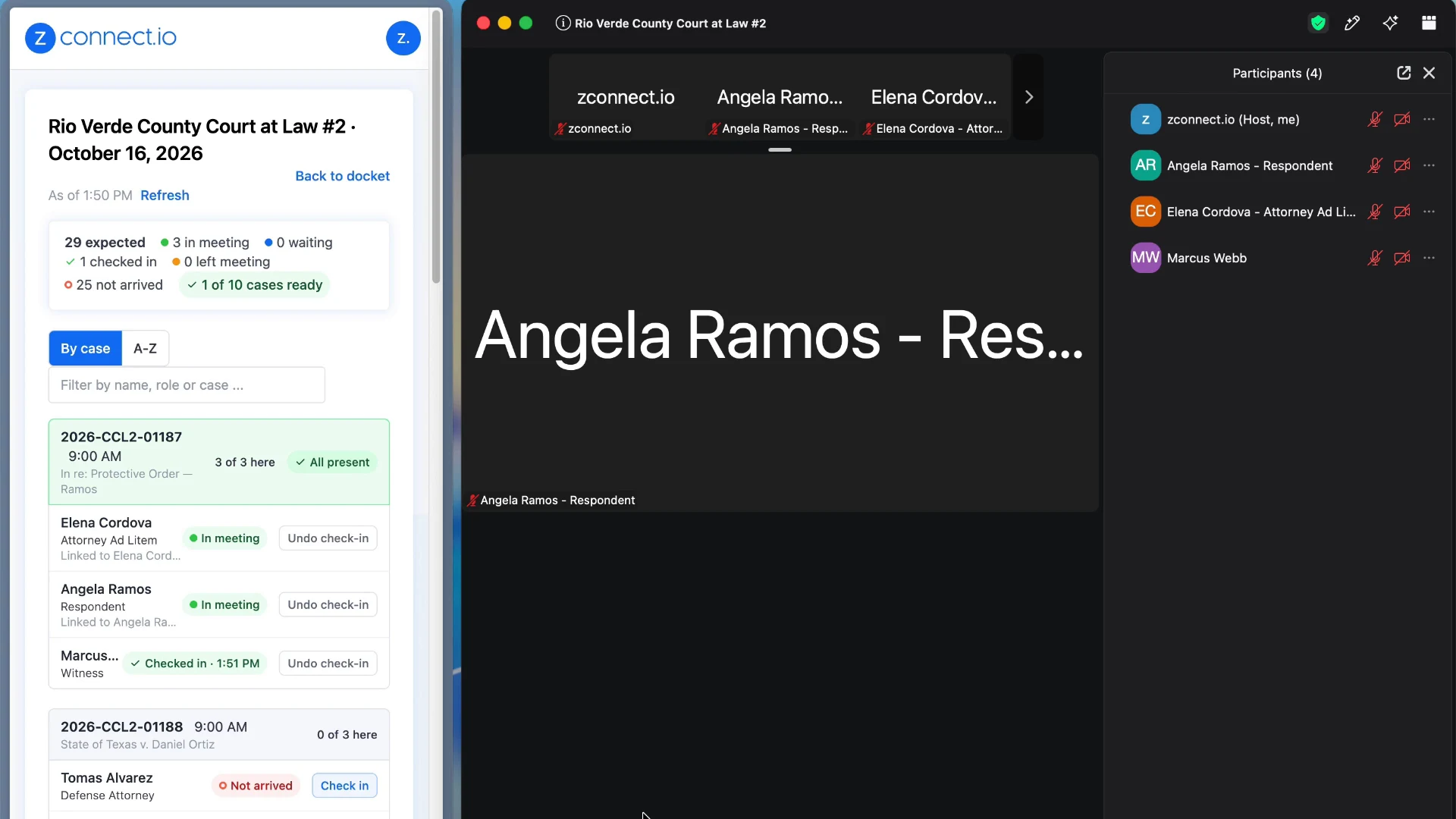
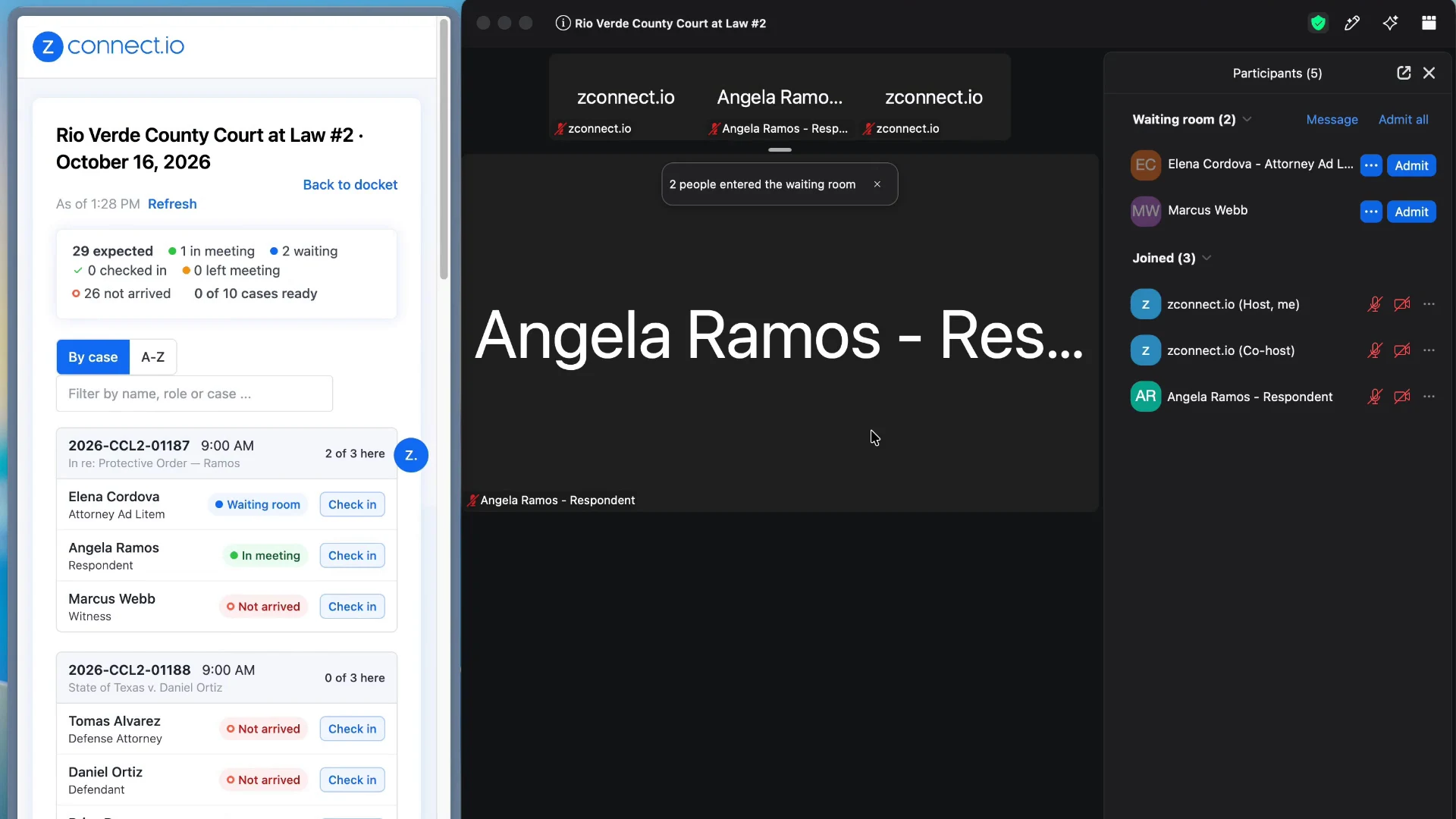
Grouped by case in the order of the day. Statuses update on their own as people join and leave. When everyone on a case is here, the case turns green, so you know exactly which one to call next.

Watch a hearing day on the dashboard 3 min
The Live Docket Dashboard next to a Zoom meeting, with one case marked All present

Check in phone callers

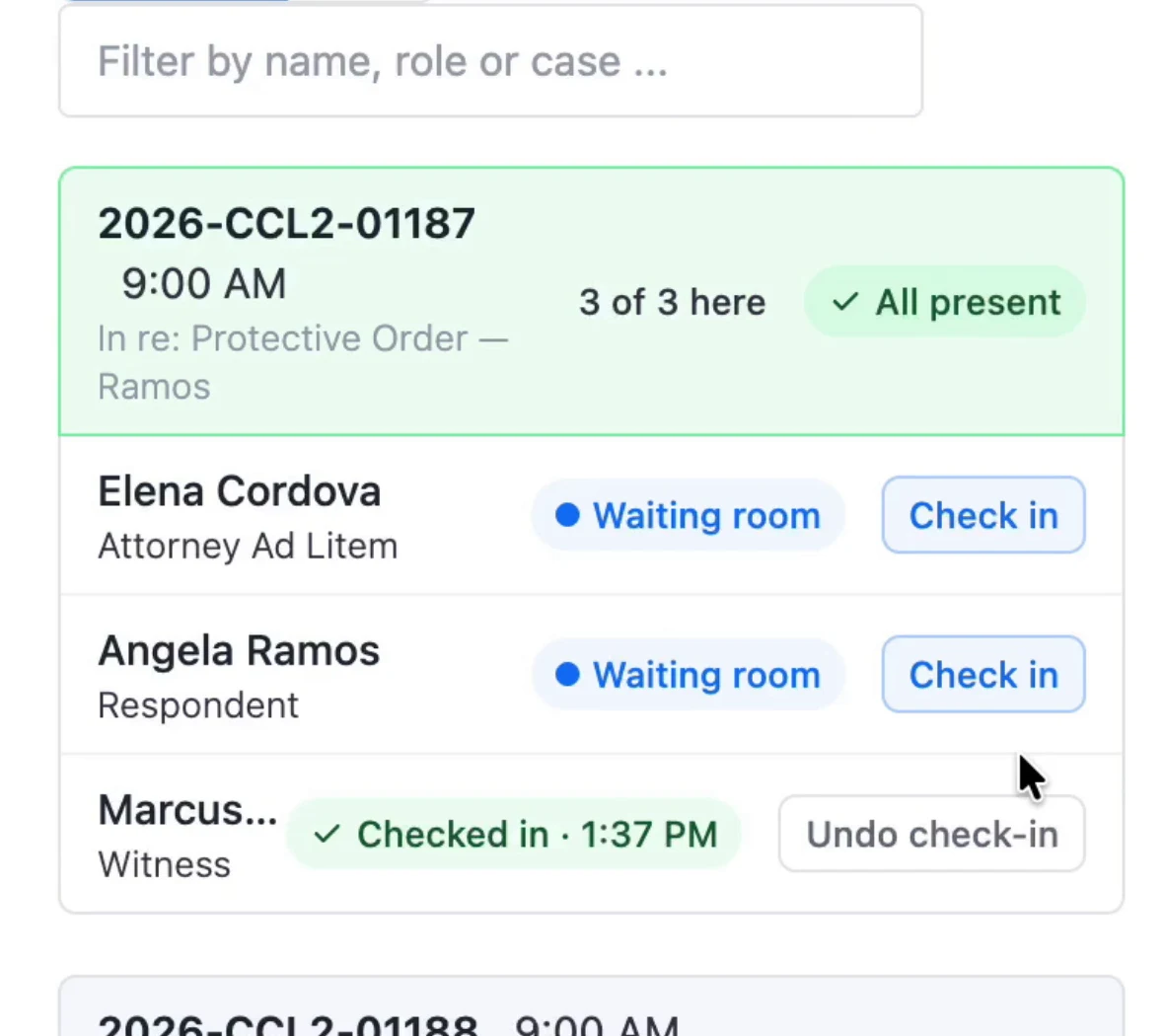
Someone dialed in? One click checks them in.

A case marked All present with one person checked in

Match Zoom's order

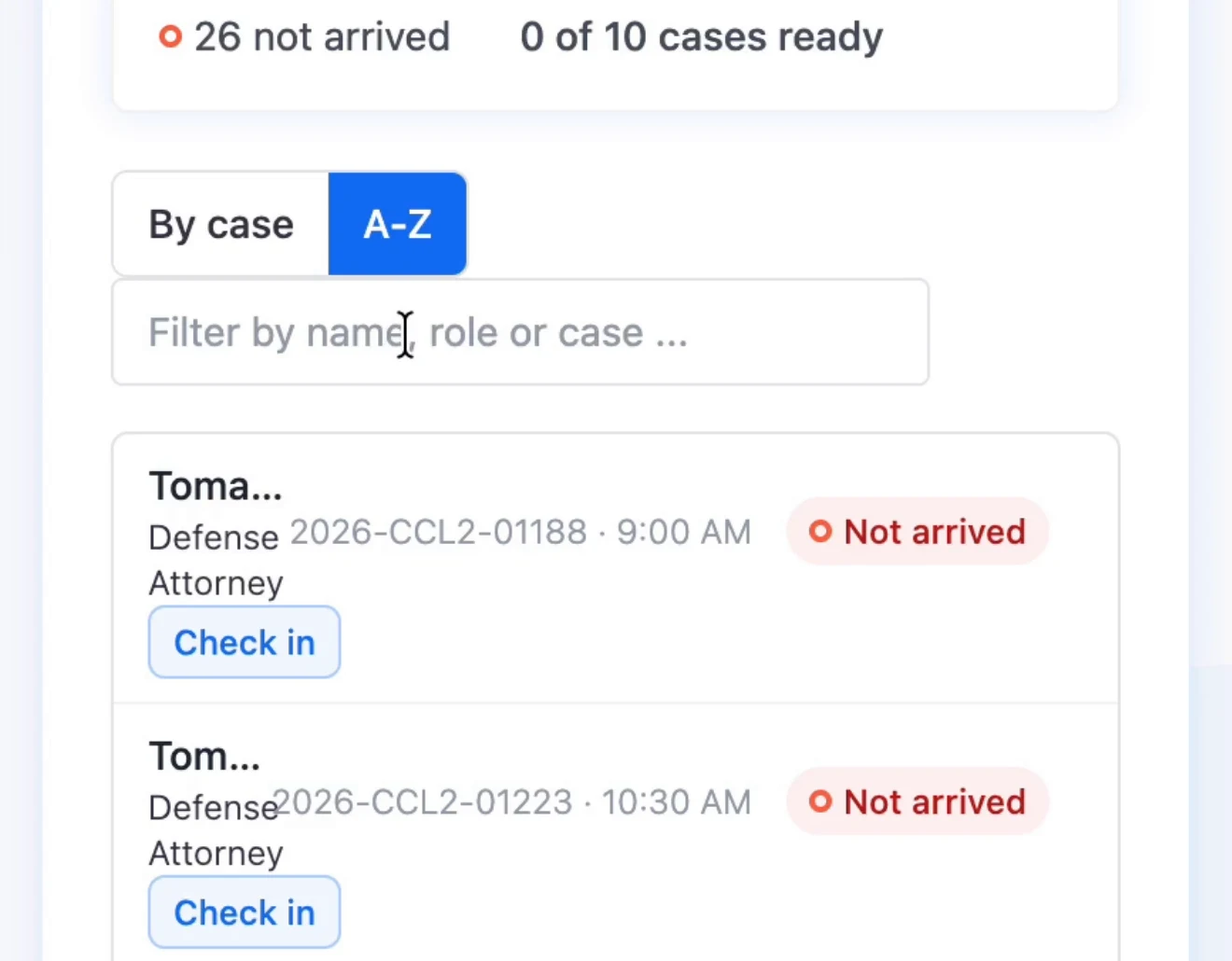
Flip to A to Z to line up with the waiting room.

The dashboard sorted alphabetically with case numbers

Not on the docket

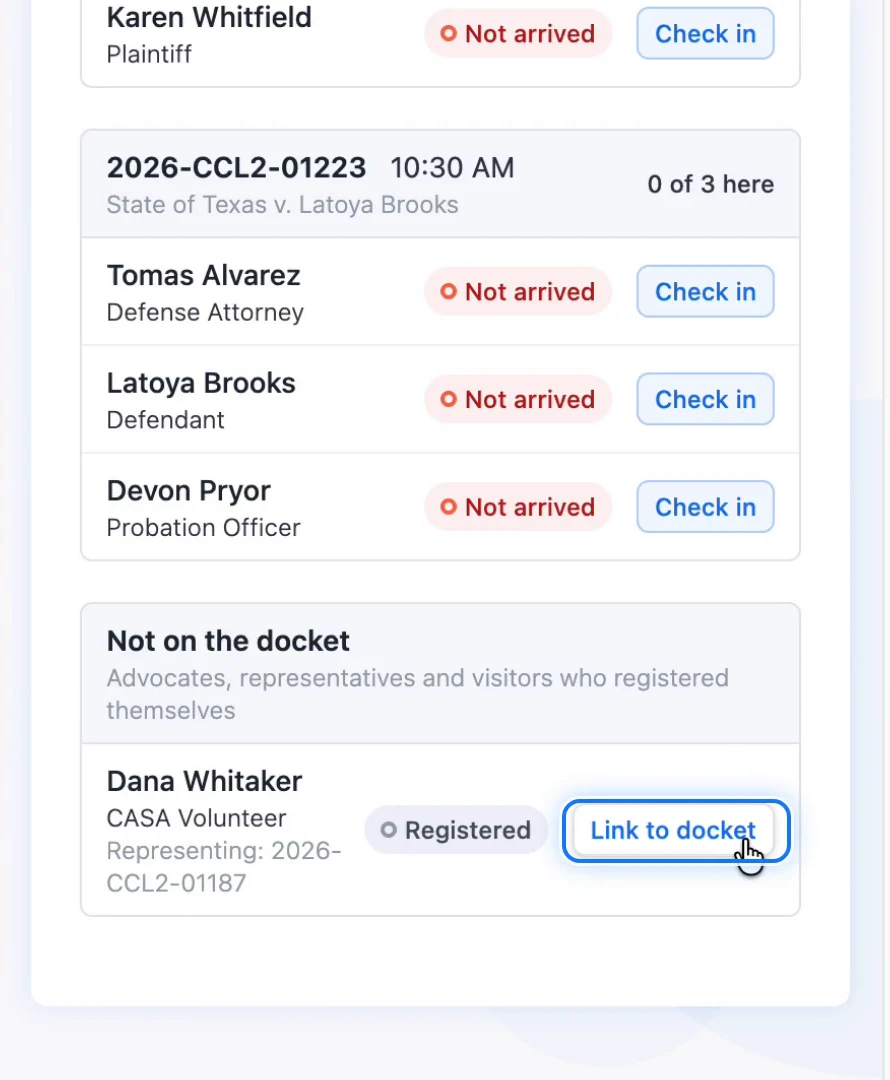
Advocates and walk-ins, linked to their case in a click.

The Not on the docket section with a Link to docket button

Share a read-only view

Your clerk or coordinator can watch from their desk.

The shared dashboard marked view only

See a whole hearing day in two minutes.

From importing the docket to calling the first case, with the dashboard and Zoom side by side.

From the bench

What judges and court staff say

The labeling is critical when you’ve got 20 to 25 people in the room on one case. It allows me to stay very organized.
Judge Carlos Villalon Jr. Hon. Carlos Villalon Jr.Associate Judge, Child Protection Court of the Rio Grande Valley West, Texas Seal of the Child Protection Court of the Rio Grande Valley West
“We’ve had a very good and positive experience with zconnect, not only with giving people efficiency in calling their cases but it’s also given the court staff their time back.”
Judge Victor Villarreal Hon. Victor VillarrealJudge, Webb County Court at Law II, Texas Seal of Webb County Court at Law II
“zconnect allows us to continue enjoying what we do.”
CR Cesia Y. RodriguezCourt Administrator, Webb County Court at Law II, Texas Seal of Webb County Court at Law II
Works with your ZoomSign in with your court's Zoom account. Admit people the way you do today.
Nothing to integrateNo connection to your case management system to set up.
English and SpanishParticipants pick their language. You set the role names.
Private by designParticipants only see their own name, role and case. Charges never show.

Questions courts ask us

Anything else? Reach us through the chat or at [email protected].

What do we need to get started?

A Zoom account. Sign in at zconnect.io with your court's Zoom account and the Quick Start Guide walks you through the rest. If you'd like a walkthrough with your team first, schedule a demo.

What docket formats can we upload?

PDF, Excel, Word, CSV or plain text, in the layout your court already uses. zconnect reads every case and every person on it, and flags anything it wasn't sure about so your staff can check it before approving.

Do we have to connect zconnect to our case management system?

No. You upload the docket you already print or export. There's nothing to integrate.

What happens if someone isn't on the docket?

Advocates, representatives and visitors check one box, pick their role and say who they're here for. If a name just isn't found, the person picks their role and registers. Either way they arrive labeled, and you can link them to their case from the dashboard.

Does it change how we run Zoom?

No. zconnect handles registration and labels before people get to Zoom. You still admit participants in Zoom the same way you do today, and the dashboard tells you who is here and which case is ready.

My court is already a customer. How do I get started?

Reach out through the chat or at [email protected] and we'll get your invitation sorted.

Run your next hearing day from one live view.

We'll walk your team through importing a docket and watching participants arrive.